Contexo in the wild — six real scenarios, start to finish
Six concrete scenarios where Contexo earns its place — walked through step by step, from the commands you run to the MCP handshakes your agent handles. Every step maps to what Contexo actually does today.
“Contexo is GitHub for AI context” is a fine one-liner, but it doesn’t tell you when you’d reach for it — or how it actually works once you do. So here are six situations teams hit with AI coding agents, each walked through step by step. Every step maps to something Contexo does today.
1. Your agent forgets everything between sessions
The problem. Every fresh session starts at zero. You re-explain the auth flow, re-describe the architecture, re-warn about the same gotcha — then you get to work. That’s the context tax, paid daily.
How Contexo solves it, step by step:
- One-time setup. In your project, run
ctx init(scaffolds.contexo/and writes the MCP config) andctx hooks install(wires Contexo into Claude Code’s Stop hook). - You just work. After each turn, the Stop hook appends a compact record to a local session buffer at
.contexo/raw/sessions/_pending/<session-id>.jsonl. No action from you. - You push. When you (or the agent) run a push and there’s a recent session plus new concept/analysis pages, Contexo pauses the push and asks the agent to capture the reasoning first.
- The agent distills. Over MCP, it reads the session buffer (
ctx_capture_session) and writes a source page (ctx_write_page) — the decision, the why, the rejected alternatives, the dead-ends — then re-pushes. Each push is a real git commit. - Tomorrow. A fresh session connects over MCP, calls
ctx_pull, and reads the always-loaded project index (ctx://index) before doing anything else.
What you get. Every session starts already knowing the project — and the reasoning survives, not just the what.
2. Your team’s agents don’t share a brain
The problem. You spent a week teaching your agent the payments module. Your teammate’s agent has no idea any of it happened. Same repo, separate silos, duplicated effort.
How Contexo solves it, step by step:
- You push your context to the shared repo — it’s a real commit on the server.
- You invite a teammate. Mint an invite key and send it over.
- They join and pull. One command joins the repo; the next pulls every page into their local
.contexo/. - Their agent is now current — it reads the same index and pages yours does.
- You manage the roster with
ctx members(andctx members remove <email>as owner).
What you get. One push and the whole team’s agents are current. Everyone’s AI works from a single source of truth instead of five private, drifting copies.
3. Onboarding burns your senior engineers’ time
The problem. Every new hire — and their AI — relearns the codebase by interrupting whoever has been here longest. The same questions, answered again.
How Contexo solves it, step by step:
- Day one, they connect. The new hire installs the CLI, runs
ctx login, andctx join <invite-key>. - They pull the knowledge base.
ctx pullbrings down every distilled page the team has built. - Their agent reads the index (
ctx://index) and searches for the area they’re starting in (ctx://search?q=billing). - It answers from the team’s context — the same decisions, gotchas, and reasoning everyone else’s agent uses — instead of asking a human.
What you get. New people and their agents ramp from the team’s accumulated context on day one, not month two, without taxing your seniors.
4. Your context is trapped in one tool
The problem. Your hard-won context lives in one tool’s chat history. Switch from Claude Code to Cursor — or run both — and you start from scratch.
How Contexo solves it, step by step:
- Contexo runs as an MCP server (
ctx mcp) over stdio — the open standard for connecting agents to tools. ctx initregisters it for Claude Code in.mcp.json. For Cursor (or any MCP client), add the samectx mcpcommand to that tool’s MCP config.- Every tool pulls the same repo. Whichever agent you open calls
ctx_pulland reads the identical context. - Contexo records who pulled. It reads the MCP client name on connect, so the activity feed shows whether Claude Code or Cursor fetched.
What you get. Your context is yours, not your editor’s. Switch tools, mix tools, or adopt a new one next year — the knowledge comes with it.
5. Your agent is quietly working from stale context
The problem. A teammate updated a context page an hour ago. Your agent is still acting on last week’s copy — and doesn’t know it.
How Contexo solves it, step by step:
- A teammate pushes a change to a page; the server’s version of it moves ahead of your last pull.
- Your agent opens that page over MCP (
ctx://wiki/<slug>). - Contexo compares your last-pulled revision against the server’s current one.
- If they differ, it prepends a drift notice to the page before the agent reads the body — so the agent knows the copy is stale (roughly):
<DRIFT_NOTICE> This page changed on the server since your last pull.
Consider pulling before you rely on it. </DRIFT_NOTICE>
ctx statusflags it too, listing drifted pages so you canctx pullbefore acting.
What you get. Your agent acts on current context — or knows to refresh first. No silent staleness steering decisions.
6. Two people edited the same page — and nobody wants a clobber
The problem. You and a teammate both refined the same context page. Whoever pushes last usually wins, and the other’s work quietly disappears.
How Contexo solves it, step by step:
- You both pull the page, then edit it independently.
- Your teammate pushes first. The server’s version moves ahead.
- You push — the server rejects it as a conflict (HTTP 409).
- Contexo hands your agent a merge directive with the common ancestor, your version, the server’s version, and a section-by-section map of what each side changed (roughly):
<MERGE_REQUIRED> page: payments-webhooks
  conflicting section:  ## Retry policy   (changed by both)
  auto-kept section:     ## Idempotency keys   (only you changed)
</MERGE_REQUIRED>- Your agent reconciles the conflicting section, writes the merged page (
ctx_write_page), and re-pushes. Contexo advances your local sync state so the re-push lands cleanly. - Everything is reviewable. Because each push is a git commit,
ctx diff,ctx history, andctx evolutionshow exactly what changed — section by section, with blame.
What you get. Nothing is silently lost, and you review changes to your context the way you review code, not as a black box.
Here’s a real diff from a Contexo page. Notice it diffs frontmatter fields and whole sections — not raw lines:
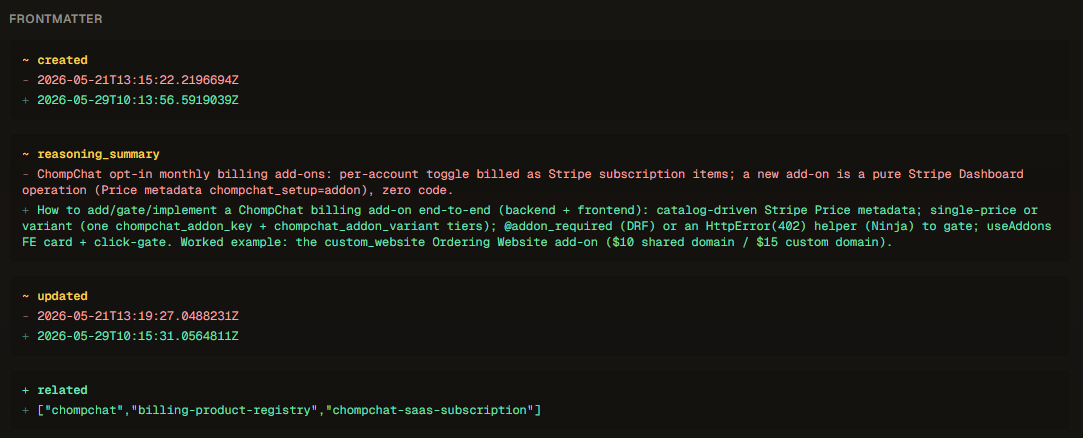 Frontmatter is diffed field by field — here
 reasoning_summary was sharpened and three related links were added.
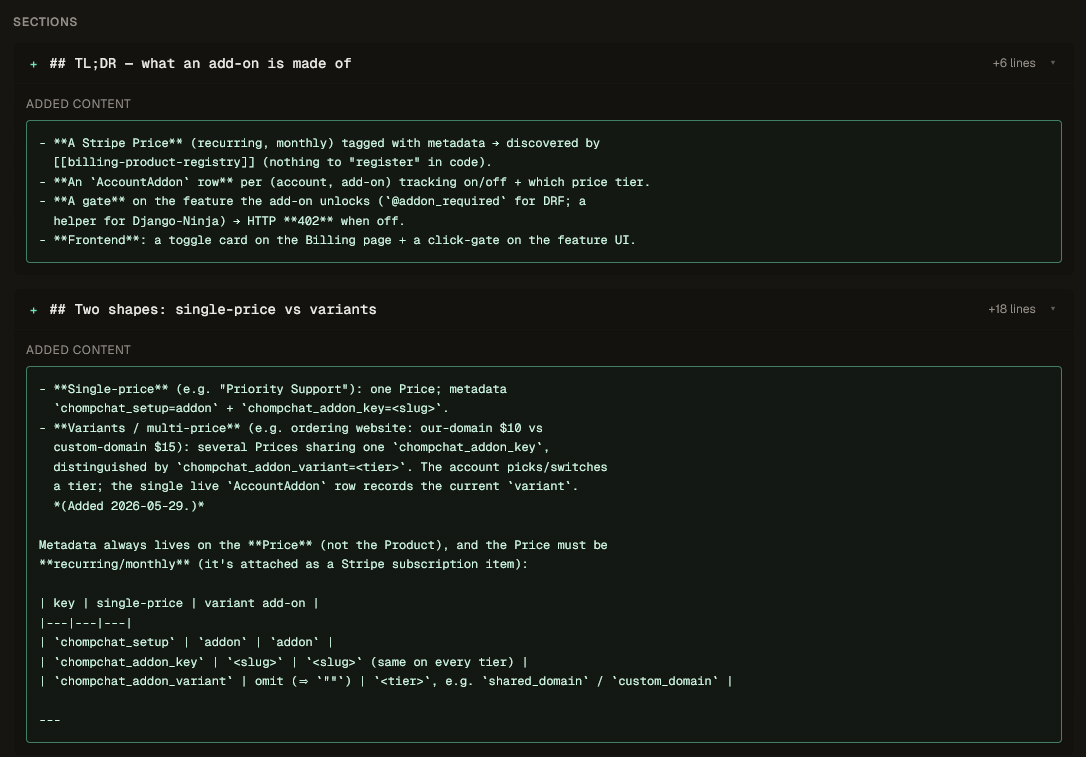 Added sections are shown whole, with a per-section line count (+6, +18).
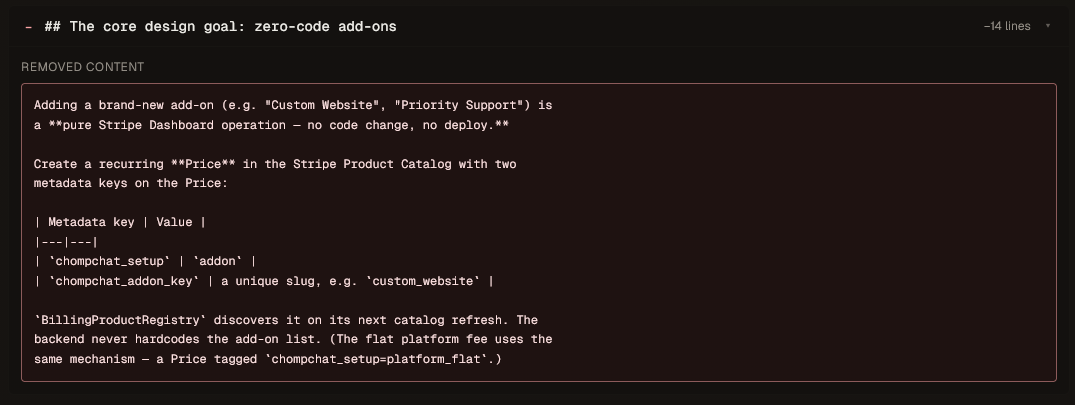 And a removed section (−14 lines), so you can see exactly what context went away — and why.
The thread through all six
Different problems, one shape of fix: a single, versioned, MCP-native place your agents read from and write to. That’s the whole idea — give the context your agents run on the same discipline your code already has.
If any of these sound like your week, point Contexo at a project:
ctx init…and let your agents start remembering. It’s open source and free to start — sign up at contexo.live, or star the repo on GitHub to follow along.
FAQ
Do I have to set Contexo up in every project? +
Yes — run ctx init once per project. It scaffolds the .contexo/ folder, writes the MCP config so your agent can connect, and can install a Claude Code Stop hook for automatic session capture.
Does Contexo capture my sessions automatically? +
After a one-time `ctx hooks install`, yes: each turn is appended to a local JSONL buffer, and on your next push your agent distills that buffer into a clean source page. Without the hook, you can still write and sync pages directly through the CLI or MCP.
Which AI tools work with Contexo? +
Any MCP-capable agent — Claude Code, Cursor, and others. Contexo runs an MCP server (ctx mcp), so the agent itself drives sync, page writes, diffs and history. It also records which client pulled, so your activity feed can tell Claude Code from Cursor.
How does Contexo handle two people editing the same page? +
A conflicting push doesn't overwrite. Contexo returns the common ancestor, your version, and the server's version, plus a section-by-section map of what each side changed. Your agent reconciles them and pushes the merged result — nothing is silently lost.
Can I self-host? +
Yes. The core server and CLI are open source; self-host the server with Docker, using git for storage and SQLite for metadata. The hosted web dashboard is the paid layer — self-hosted deployments use the CLI and MCP.